
 Inggris
 中文简体
中文简体 Русский
 Español
 Português
 Türkçe
 العربية
 Deutsch
 Polski
 Italiano
 Français
 한국어
한국어 ไทย
ไทย Tiếng Việt
 日本語
日本語

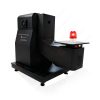











Generator Gelombang Dering
Pengguna manual
berlaku LISUN Model: RWG61000-12,RWG61000-12A,RWG61000-12AT,RWG61000-12T
1. Membuka Kemasan dan Mengenal Peralatan Secara Dasar
1.1 Spesifikasi Teknis Utama
| LISUN Pilih Model | RWG61000-12 | RWG61000-12T | RWG61000-12A | RWG61000-12AT |
| Tegangan Output | 0–4 meter persegi | 0–6 kV (special order) | ||
| Voltage/Current Waveforms | Turn-on voltage rise time: 0.5 μs; short-circuit current rise time: ≤ 1 μs; oscillation frequency: 100 kHz ± 10% | |||
| Polaritas Lonjakan | Positive, Negative, and Alternating Positive and Negative | |||
| Sudut fase | Asynchronous, synchronous 0°–360° or specific angles | |||
| Output Impedance | 12 , 30 | |||
| Coupling dan Decoupling Network | Includes a 16A single-phase CDN | Includes 20A 3-phase/5-wire CDN | Includes a 16A single-phase CDN | Includes 20A 3-phase/5-wire CDN |
| Sumber Daya listrik | AC 220 V (110 V optional) ±10%, 50/60 Hz | |||
| Dimensi (P x L x T) | 44 × 45 × 35 cm | 44 × 45 × 20 cm, 44 × 45 × 35 cm (CDN) |
44 × 45 × 30 cm, 44 × 45 × 20 cm (CDN) |
44 × 45 × 30 cm, 44 × 45 × 35 cm (CDN) |
| Berat Kotor | Tentang 28 kg | Tentang 46 kg | Tentang 45 kg | Tentang 48 kg |
1.2 Membuka Kemasan dan Memeriksa Isinya
1.2.1 Membuka Kemasan dan Pemeriksaan Visual
When unpacking the device, handle it gently to avoid scratching the casing with sharp objects. After unpacking, first inspect the exterior of the device to ensure there is no visible deformation or dents, and that the buttons are not damaged or loose. If you notice any abnormalities with the device or its accessories, do not turn it on. Please contact us immediately.
1.2.2 Unit Utama dan Aksesoris
Peralatan: RWG61000-12 Ring Wave Generator; ITEU series Isolation Transformers, used to power samples via the Ring Wave Generator.
Note 1: The Ring Wave Generator must be used in conjunction with an Isolation Transformer to protect the power grid; this manual uses the ITEU series of Isolation Transformers as an example.
Aksesoris standar:
| Jumlah | Note |
| ① | Power Cord for a Ring Wave Generator |
| ②③ | Use the built-in CDN power input cable to connect either the output of the Isolation Transformer or the built-in CDN power input of the Ring Wave Generator—choose one of the two. |
| ④⑤ | Built-in CDN output cable for connecting to the EUT; choose one of the following |
| ⑥ | Kabel ground, digunakan untuk menghubungkan ke terminal ground pelindung PGND. |
| ⑦ | Coaxial cable, used to connect an external oscilloscope for waveform monitoring |
| ⑧ | Discharge tube: used to check whether the device is producing an output in the event of a malfunction. |
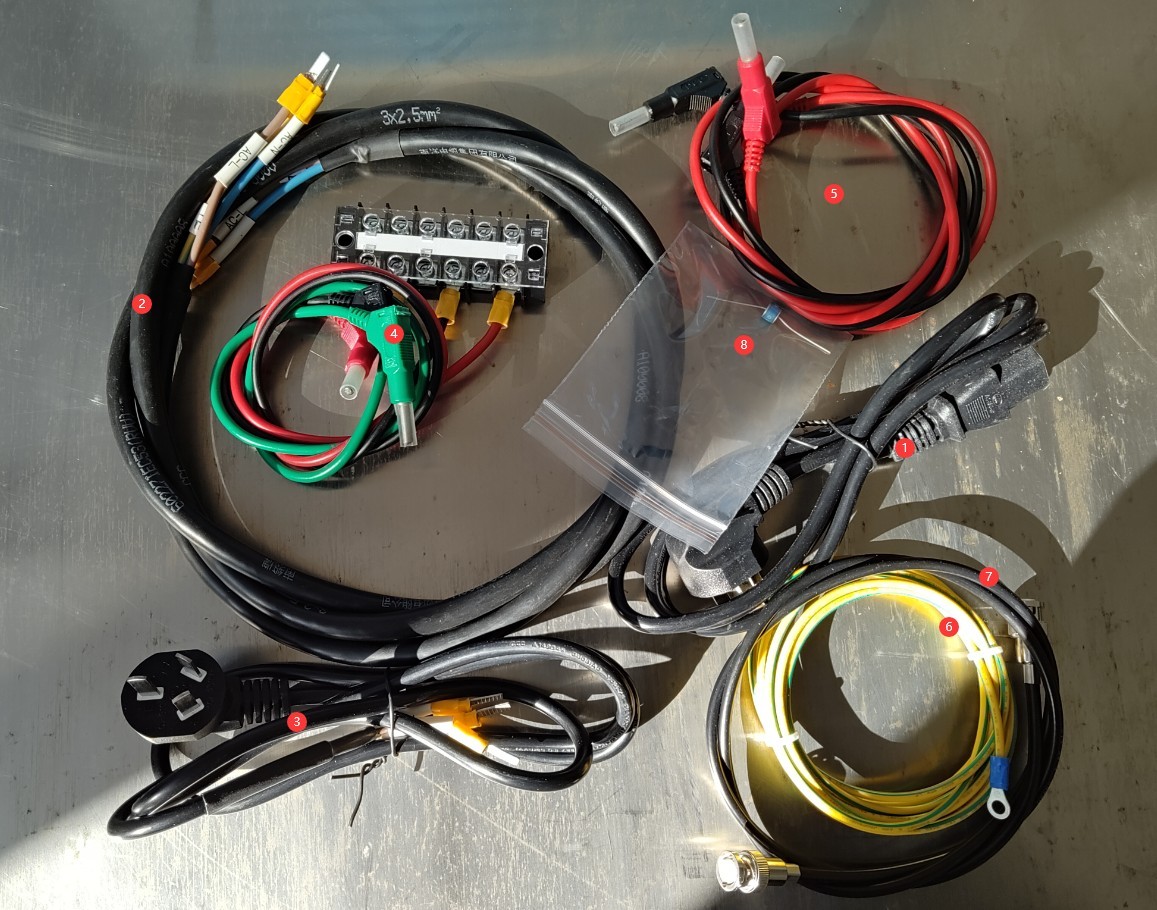
Gambar 1
Tautan unduhan untuk manual pengguna digital, perangkat lunak, kartu garansi, dan materi lainnya telah dikirim melalui email. Silakan unduh sesegera mungkin. Jika Anda melewatkan email tersebut, Anda dapat menghubungi kami untuk meminta tautan unduhan lagi.
1.3 Deskripsi Struktur Peralatan
1.3.1 Front View of the Device
| Jumlah | Note |
| ① | EUT Power Indicator Light |
| ② | High-Voltage Indicator Light |
| ③⑤ | Built-in CDN output; simply choose one to connect to the EUT. |
| ④ | Source output, used to connect to an external CDN |
| ⑥ | Touchscreen |
| ⑦ | Oscilloscope Interface: To view the device’s output waveforms, connect it to an oscilloscope using a coaxial cable. |
| ⑧ | USB port, for connecting a USB mouse |
| ⑨ | Saklar daya |
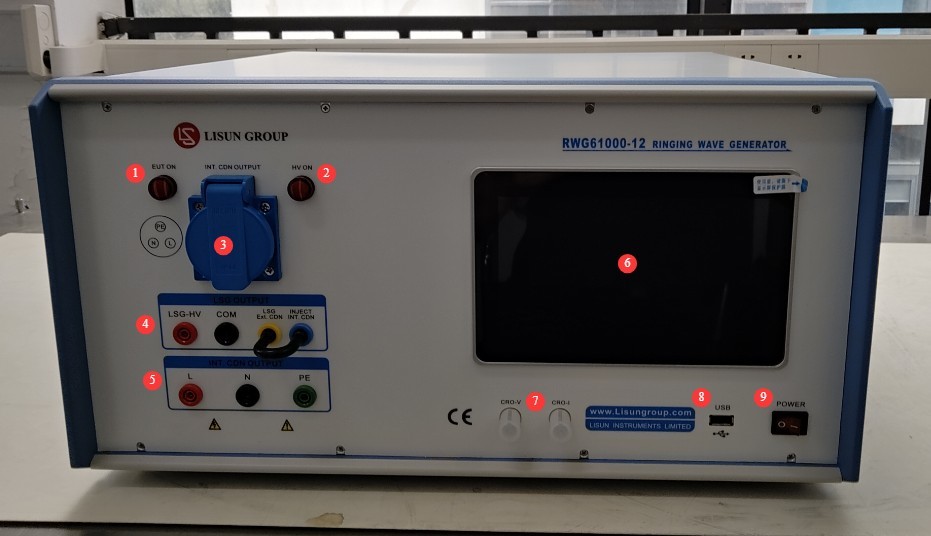
Gambar 2
1.3.2 Bagian Belakang Perangkat
| Jumlah | Note |
| ① | Power Cord Connector |
| ② | Remote port; unless otherwise specified, this port has no function. |
| ③ | If you have purchased an external CDN, you can connect to it. |
| ④ | Built-in CDN Input Power Supply Switch |
| ⑤ | The built-in CDN input power supply is used to supply power to the EUT and must be connected to an Isolation Transformer; failure to do so may cause the laboratory circuit breaker to trip. |
| ⑥ | For a secure connection, please keep the U-shaped plug inserted; no adjustments are necessary. |
| ⑦ | PGND: Protective Ground Terminal. Please ensure proper grounding. |
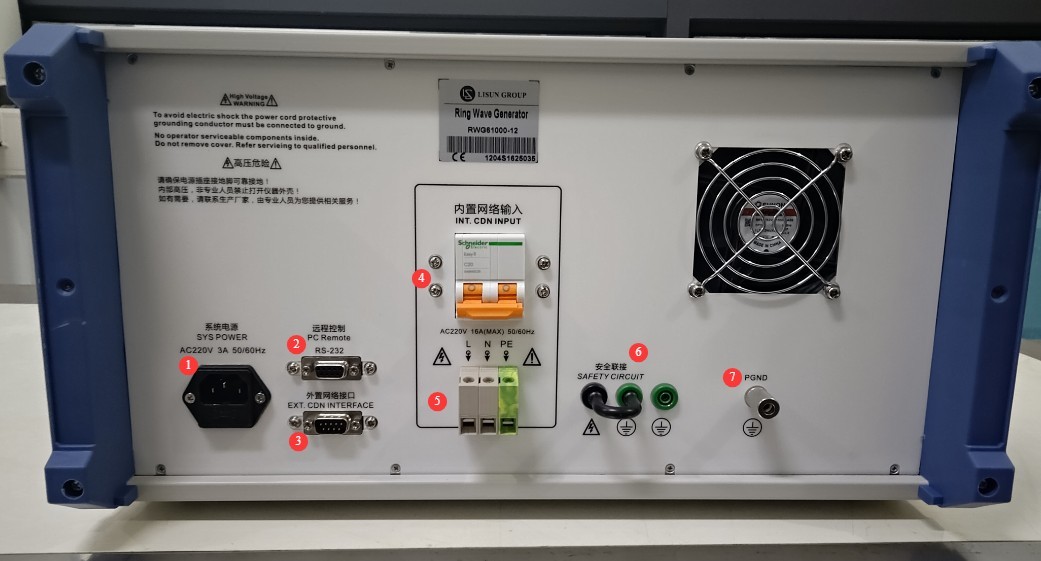
Gambar 3
2. Tindakan Pencegahan Keamanan
2.1 Pedoman Penempatan
Ensure the ambient temperature is between 15°C and 35°C, relative humidity between 10% and 60% (no condensation), and atmospheric pressure between 86 kPa and 106 kPa to prevent high-voltage short circuits or damage to the equipment caused by moisture;
The premises must be free of strong electromagnetic interference, corrosive gases, flammable or explosive materials, and dust, and must be well-ventilated to prevent sparks from causing hazards;
Place it on a stable workbench; avoid tilting or inverting it, and keep it away from sources of vibration;
Transformator Isolasi: Jauhkan setidaknya 0.5 meter dari unit utama untuk mencegah interferensi kopling elektromagnetik;
Peralatan harus ditempatkan setidaknya 1 meter dari dinding dan struktur di sekitarnya (seperti peralatan pengujian dan rak lainnya) untuk memudahkan perawatan; setidaknya 2 meter ruang harus dibiarkan di depan peralatan untuk memastikan pengoperasian yang lancar, dan tidak boleh ada penghalang di area sekitarnya.
2.2 Standar Keselamatan Tegangan Tinggi
2.2.1 Pemeriksaan Keamanan
Pastikan tegangan catu daya peralatan sesuai dengan tegangan listrik utama (AC 220 V ±10%, 50/60 Hz), dan pastikan catu daya terhubung ke ground dengan benar dan kabel ground tidak rusak atau longgar;
Grounding Requirements: The host unit’s protective grounding terminal (PGND) must be connected to ground, with a grounding resistance of ≤4Ω, to ensure safe discharge of high voltage;
Operator harus memiliki tangan yang kering dan tidak boleh mengenakan perhiasan logam apa pun.
2.2.2 Persyaratan Keselamatan untuk Prosedur Operasional
Operators must undergo professional training and be familiar with this manual and the relevant standards. Non-professionals are prohibited from operating or disassembling the equipment. The equipment contains high-voltage circuits; opening the cover may pose an electric shock hazard. Contact the manufacturer’s technical staff for repairs.
The equipment generates high-voltage, high-current ringing waves during operation. Do not touch the pulse output interface, EUT terminals, or CDN port under any circumstances.
During testing, unauthorized personnel are prohibited from remaining within 1 meter of the EUT to prevent accidental electric shock or interference from electrical discharges.
Sebelum mengganti sambungan atau mengganti EUT, Anda harus terlebih dahulu memastikan bahwa output tegangan tinggi dimatikan (lampu indikator HV mati) dan menunggu setidaknya 5 menit untuk memastikan bahwa kapasitor tegangan tinggi internal telah sepenuhnya habis dayanya.
Jangan makan atau minum selama pengujian untuk mencegah kecelakaan akibat sengatan listrik.
Jika melibatkan beberapa orang, tetapkan peran dan tanggung jawab dengan jelas, dan konfirmasikan satu sama lain sebelum memulai pengujian untuk menghindari kesalahan.
2.3 Langkah-langkah Tanggap Darurat
Jika terjadi sengatan listrik: Segera matikan aliran listrik utama ke peralatan, pindahkan operator ke area yang aman, berikan pertolongan pertama jika perlu, dan hubungi petugas medis.
Kerusakan Peralatan (Asap, Suara Aneh, Bau Aneh): Segera matikan peralatan dan cabut catu daya; cabut semua kabel; jangan hidupkan kembali peralatan; hubungi produsen untuk perbaikan.
Keluaran lonjakan abnormal: Hentikan pengujian, hubungi produsen untuk pemecahan masalah, dan jangan sentuh port pengujian secara langsung dengan tangan Anda.
2.4 Lainnya
Untuk hal-hal yang tidak tercakup dalam panduan ini, harap berhati-hati atau hubungi kami.
3. Equipment Wiring
3.1 Basic Wiring (Built-in CDN, Default Standard Mode)
Wiring on the back of the device.
| Jumlah | Note |
| ① | Power cord: Connect to the appropriate power source according to the markings. |
| ② | The CDN has a built-in power input terminal; connect it to an appropriate Isolation Transformer based on the EUT parameters. |
| ③ | PGND: Protective ground wire, connected to earth |
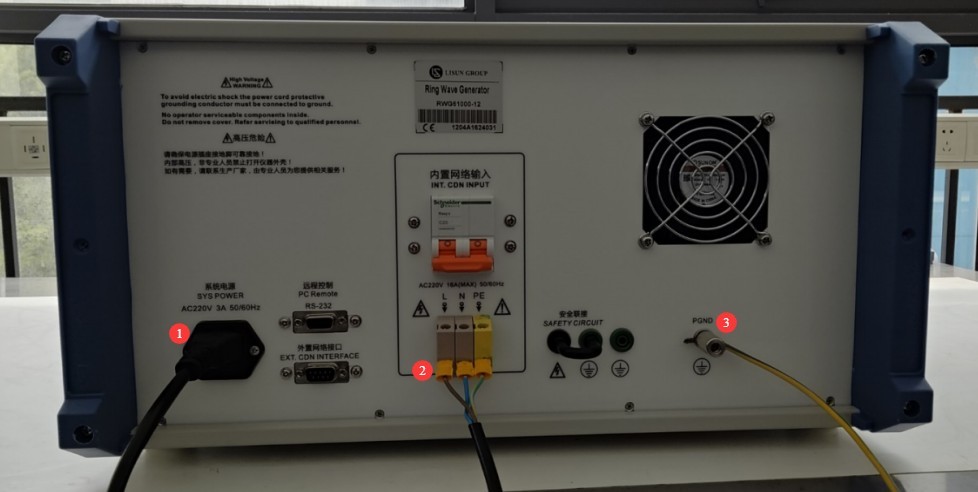
Gambar 8
Wiring on the front of the device.
| Jumlah | Note |
| ① | At the input end of the Isolation Transformer, connect the Isolation Transformer to an appropriate power source based on the EUT parameters. |
| ② | Connect the output of the Isolation Transformer to the input of the built-in CDN power supply for the ringing wave. |
| ③ | Built-in CDN output port connected to the EUT |
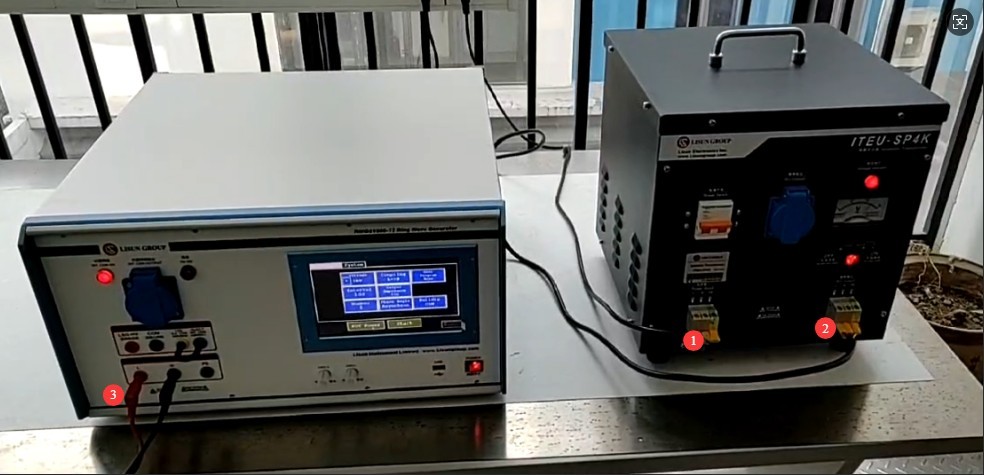
Gambar 9
EUT Connection:
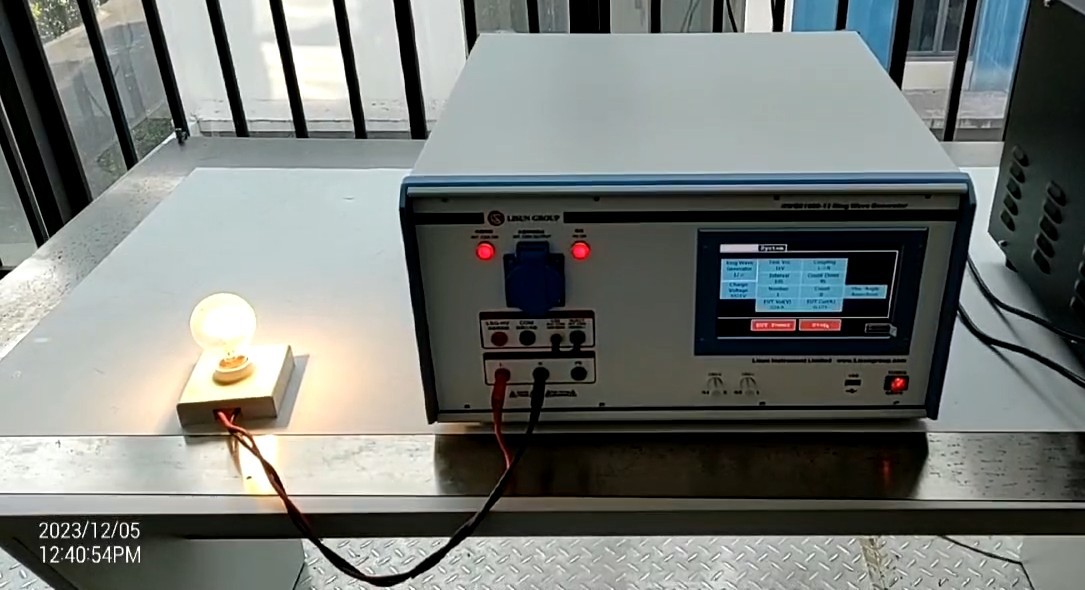
Gambar 10
Note 1: The EUT must be placed on the left side of the device to prevent the EUT’s connection cables from passing in front of the touchscreen.
Note 2: The EUT must be kept at a safe distance (≥30 cm) from the equipment.
3.2 External CDN Configuration (When an External CDN Is Selected)
Connecting the Ring Wave Generator to an External CDN:
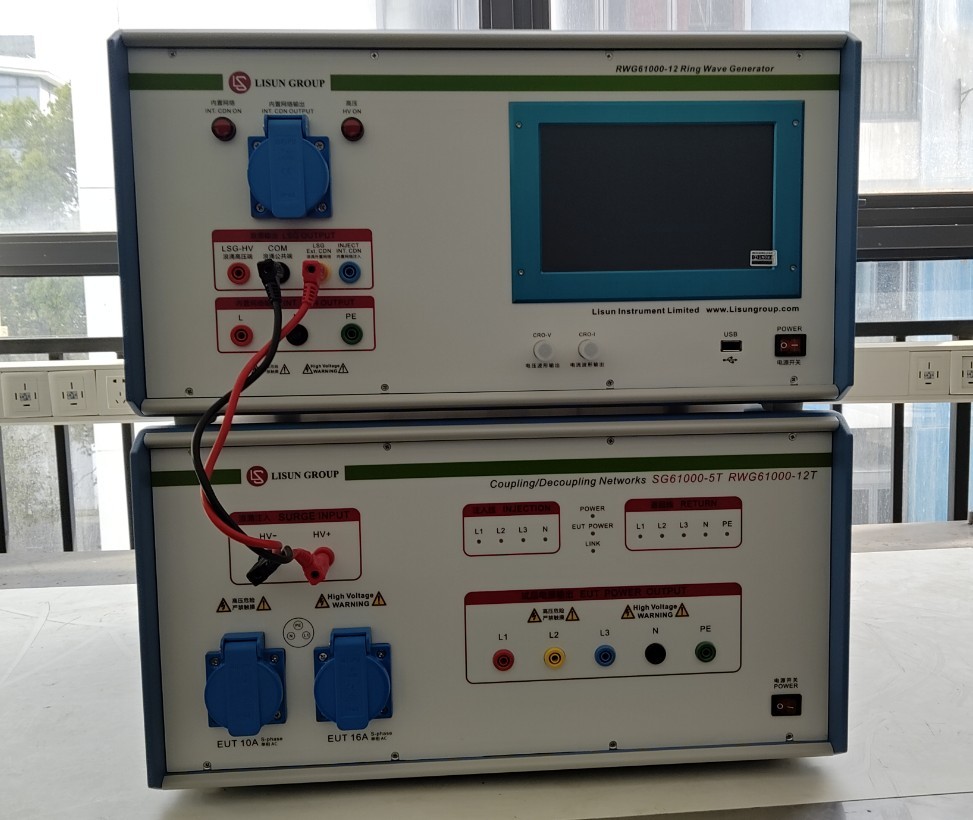
Gambar 11
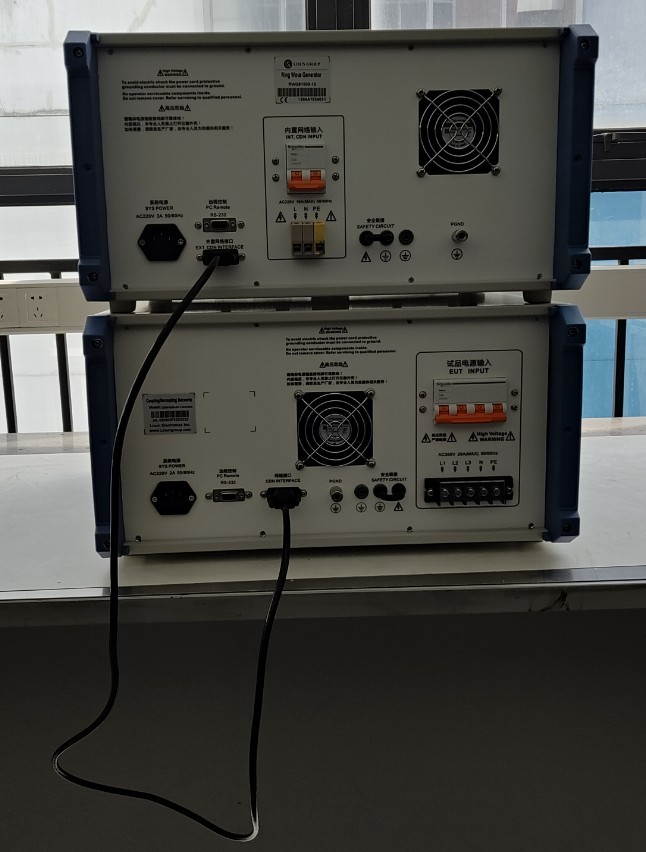
Gambar 12
Note: When using an external CDN, all input and output cables for the built-in CDN and all wiring for the EUT must be transferred to the external CDN, and control must be performed using the switches on the external CDN.
4. Pengantar Program Layar Sentuh
4.1 Layar Awal Program
| Jumlah | Note |
| ① | General Usage Guidelines (This feature is still under development; please do not attempt to use it at this time) |
| ② | Layar Informasi Sistem |
| ③ | Beralih antara Bahasa Mandarin dan Bahasa Inggris |
| ④ | Antarmuka Program |
| ⑤ | Ring Tone Test Interface |
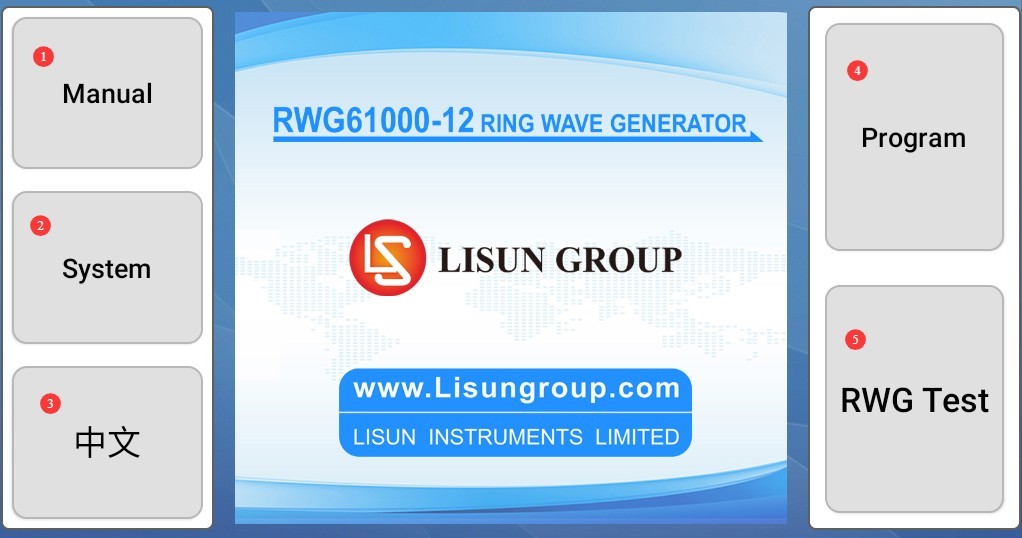
Gambar 4
4.2 System Information Screen
Click to view historical test logs.
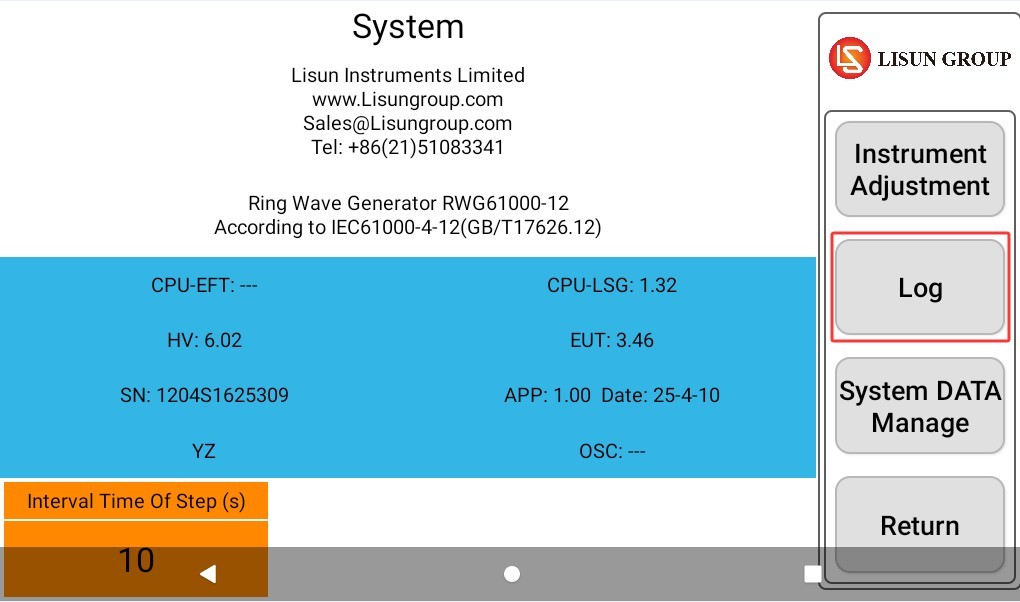
Gambar 5
4.3 Antarmuka Program
The testing process can be programmed according to specific requirements, and different test parameters can be set for each step. When the program runs, it automatically adjusts the parameters based on the settings to perform the tests.
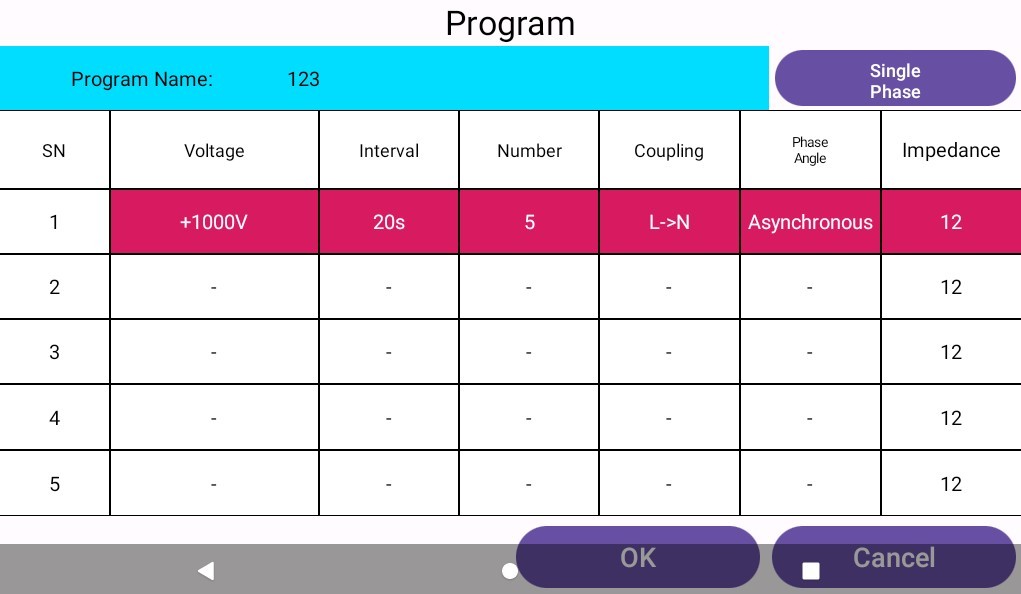
Gambar 6
4.4 Ring Tone Test Interface
| Jumlah | Note |
| ① | Set the Test Voltage and Polarity |
| ② | Set the interval between the two ring tones |
| ③ | Set the number of tests |
| ④ | Equipment Coupling Direction |
| ⑤ | Set the coupling phase angle |
| ⑥ | Select Output Impedance |
| ⑦ | You can select a pre-built program for testing. |
| ⑧ | Display the EUT’s current voltage and current |
| ⑨ | Click to turn the EUT’s power on or off |
| ⑩ | Kembali ke Layar Beranda |
| ⑪ | Click to start or stop the test |
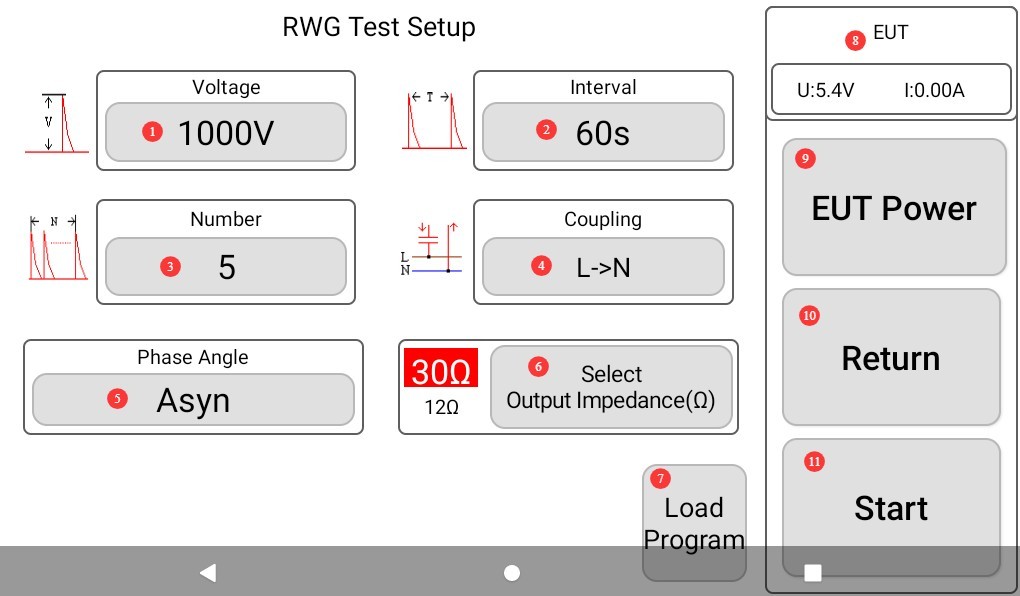
Gambar 7
Note: If you select “Program Test,” the other parameters set on this screen will be invalid.
5. Ring Tone Test
5.1 Konfirmasi Parameter Uji
5.1.1 Severity Level
| Tingkat Keparahan | Line-to-Line (Differential) | Line-to-Ground (Common Mode) | Gunakan Kasus |
| Level 1 | 0.5 kV | 1 kV | Low-interference environments, such as controlled laboratories |
| Level 2 | 1 kV | 2 kV | General Industrial Environments |
| Level 3 | 2 kV | 4 kV | Lingkungan Industri yang Keras |
| Level 4 | 4 kV | 8 kV | Extreme electromagnetic environments, such as outdoor equipment |
| Tingkat Akses | Special values for voltages higher than 4 kV or lower than 0.5 kV | Special values greater than 8 kV or less than 1 kV | Special Provisions in Product Standards |
| Output Impedance | 12 Ω (AC/DC power cables, shielded interconnects); 30 Ω (unshielded interconnects) | ||
5.1.2 Prosedur Uji
| Parameter Teknis | Persyaratan Teknis | Source of the Provisions |
| Jumlah aplikasi | 5 positive-polarity tests and 5 negative-polarity tests at each test point, for a total of 10 tests | Chapter 8 of the Standard: Test Procedures |
| Tingkat Percepatan | Once per minute (every 60 seconds) | |
| Apply Phase | The AC power port should be energized once at the zero-crossing point, once at the peak, and once at a phase angle of 45°. | Ensure coverage under the most severe operating conditions |
| Metode Kopling | Power ports are coupled via a Coupling and Decoupling Network (CDN); signal/control ports are coupled via a CDN or direct capacitive coupling. | Section 6.2 of the Standard: Coupling and Decoupling Network |
5.2 Testing Process (Using a Built-in CDN as an Example)
Adjust the Isolation Transformer’s output voltage according to the EUT’s requirements and supply the power;
Turn on the built-in CDN input power supply switch on the back of the Ring Wave Generator;
On the touchscreen program interface, after setting the test parameters, click “EUT POWER” to turn on the EUT power supply. At this point, the EUT power indicator light on the front panel of the Ring Wave Generator will illuminate;
Set the EUT to its normal operating state in accordance with the EUT product specifications;
Click “START” to begin the ringing wave test.
5.3 Evaluasi Hasil Tes
| Tingkat | Kriteria evaluasi | Lulus atau Gagal | Gejala Khas |
| Nilai A (Kriteria A) | Performa sepenuhnya normal dalam batas yang ditentukan, tanpa anomali apa pun. | Biasanya dianggap telah lulus | Tidak ada waktu henti, pengaturan ulang, gangguan tampilan, atau kehilangan data; parameter utama berada dalam batas yang dapat diterima. |
| Nilai B (Kriteria B) | Hilangnya atau berkurangnya fungsi atau kinerja secara sementara, tetapi pemulihan terjadi secara otomatis setelah gangguan berhenti, tanpa memerlukan intervensi operator. | Harus diatur terlebih dahulu; umumnya dapat diterima. | Automatically resumes after a brief communication interruption; returns to normal after the screen flickers; returns to normal after a brief deviation from specifications |
| Kelas C (Kriteria C) | Kehilangan atau penurunan fungsi atau kinerja sementara yang memerlukan intervensi manual untuk memulihkannya (misalnya, memulai ulang, mengatur ulang) | Harus diatur terlebih dahulu; dapat diterima dalam situasi tertentu. | If the equipment freezes, it must be manually restarted; if the program crashes, it must be reloaded; if parameters are abnormal, they must be manually adjusted. |
| Nilai D (Kriteria D) | Hilangnya fungsi secara permanen atau penurunan kinerja akibat kerusakan perangkat keras/perangkat lunak atau kehilangan data. | Ditetapkan sebagai kegagalan | Components burned out, circuit boards damaged, stored data permanently lost, core functions unable to be restored |
6. Prosedur Pasca-Ujian
6.1 Penghentian Tes
Jika EUT terlihat rusak selama pengujian, segera ketuk “Hentikan Pengujian” pada layar sentuh dan ketuk “Daya EUT” untuk mematikan daya EUT.
If no anomalies occur during the test, wait for the ringing tone test to end automatically, then click “EUT Power” to turn off the EUT.
Turn off the CDN input power supply switch built into the host.
Wait 5 minutes to ensure that the high-voltage capacitors inside the main unit have completely discharged, then replace the EUT for testing, or turn off the power to the main unit and the Isolation Transformer.
6.2 Post-Test Preparation and Cleanup
Clean up the test area and wipe it down with a dry cloth. Do not use alcohol or corrosive cleaning agents.
Ring wave testing is a destructive test; it does not automatically generate a test report, but the device automatically saves the test data. You can go to “System Information” to view and export the test log, which can be exported to a USB flash drive via the USB port. The exported file is in TXT text document format.
6.3 Penyimpanan Peralatan
6.3.1 Persyaratan Penyimpanan Jangka Pendek
Jika peralatan tersebut digunakan setiap hari, tidak diperlukan tindakan lebih lanjut setelah pembersihan selesai dilakukan setelah setiap pengujian.
6.3.2 Persyaratan Penyimpanan Jangka Panjang
Jika perangkat tidak akan digunakan dalam jangka waktu lama (lebih dari satu bulan), harap lepaskan semua kabel dan tutupi perangkat dengan penutup debu untuk mencegah penumpukan debu.
Perangkat ini sebaiknya dinyalakan sekali sebulan selama setengah jam saja untuk mencegah penuaan komponen listrik (seperti kapasitor dan kontaktor).
7. Pemecahan Masalah dan Penyelesaian Masalah Umum
7.1 Perangkat tidak mau menyala
Symptom: After turning on the power switch, the device shows no response (the indicator light does not come on, and the fan does not spin).
Kemungkinan penyebabnya: ① Kabel daya tidak terhubung dengan benar atau rusak; ② Tegangan suplai tidak normal; ③ Sekring putus; ④ Varistor (MOV) terbakar.
Solution: Ensure the power cord is intact and securely connected. Power supply issues—such as unstable voltage, excessively high voltage, or harmonic interference—can cause the fuse or varistor to burn out. We recommend using a voltage-stabilized, pure sine wave AC power supply to power the device. Replace the fuse or varistor with one of the same type.
Gambar di bawah ini menunjukkan lokasi sekering:
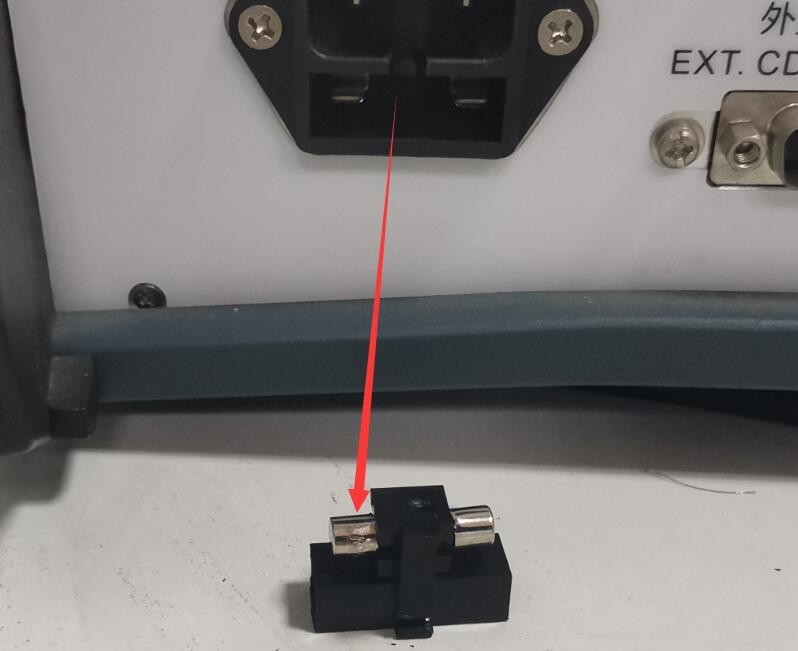
Gambar 13
The figure below shows the location of the MOV (metal-oxide varistor) inside the filtered power supply:
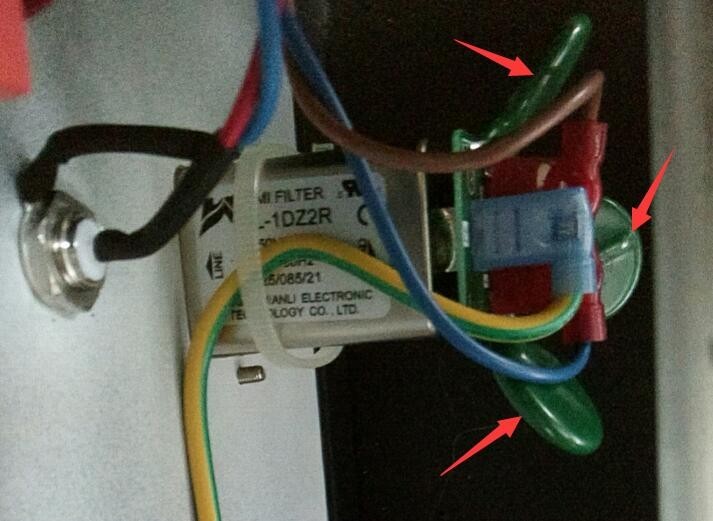
Gambar 14
7.2 Pemutus Sirkuit Terputus di Laboratorium
Symptom: When a ringing wave is output, the laboratory ground-fault circuit interrupter trips.
Kemungkinan penyebab: Transformator isolasi tidak terhubung.
Solution: Connect an Isolation Transformer. During ringing wave tests, large transient pulse currents are generated; if an Isolation Transformer is not connected, it may cause the laboratory’s ground-fault circuit interrupter to trip.
7.3 Restart Perangkat Otomatis
Gejala: Perangkat akan otomatis memulai ulang saat terjadi lonjakan daya.
Possible cause: The ground wire is not properly connected.
Solution: Connect the PGND grounding terminal on the back of the host to ground, and ensure that the grounding resistance is ≤4Ω. Otherwise, high voltage may not be safely dissipated, causing the device to automatically restart.
7.4 Uji Sudut Fase Lonjakan Gagal
Symptom: The synchronization phase angle was set, but the ringing test did not follow the corresponding phase angle.
Possible cause: The EUT power is not turned on.
Prosedur: EUT (Equipment Under Test) harus diberi daya oleh sumber AC, dan harus dinyalakan selama pengujian agar generator lonjakan daya dapat mendeteksi bentuk gelombang daya EUT dan melakukan uji lonjakan daya sesuai dengan sudut fasa yang telah ditetapkan.
7.5 Bentuk gelombang mengandung interferensi
Symptom: When using a CRO connected to an oscilloscope port to examine ringing and surge waveforms, some noise becomes visible upon magnifying the waveform.
Possible cause: The CRO port is designed for user convenience, allowing quick and easy access to waveform data, but it may generate a small amount of noise.
Procedure: If you need to obtain the actual output waveform of the surge generator, or if you wish to calibrate the device, use an oscilloscope and a high-voltage probe to directly inspect the waveform at the CDN output.