 Inggris
 中文简体
中文简体 Русский
 Español
 Português
 Türkçe
 العربية
 Deutsch
 Polski
 Italiano
 Français
 한국어
한국어 ไทย
ไทย Tiếng Việt
 日本語
日本語











Pengukur Gloss
Pengguna manual
berlaku LISUN Model: AGM-500PRO
1. Membuka Kemasan dan Mengenal Peralatan Secara Dasar
1.1 Spesifikasi Teknis Utama
| Spesifikasi/Nomor Model | AGM-580 | RUPST-500 | AGM-500PRO |
| Nama Produk | Pengukur Kilap Tiga Sudut | Pengukur Kilap Sudut Tunggal | |
| Mengukur Sudut | 20 °, 60 °, 85 ° | 60 ° | |
| Rentang Pengukuran | 20°: 0–2000 GU | N / A | |
| 60°: 0–1000 GU | 60°: 0–1200 GU | ||
| 85°: 0–160 GU | N / A | ||
1.2 Membuka Kemasan dan Memeriksa Isinya
1.2.1 Membuka Kemasan dan Pemeriksaan Visual
When unpacking the device, handle it gently to avoid scratching the outer casing with sharp tools. After unpacking, first inspect the exterior of the device to ensure there are no obvious deformities or dents, and that the buttons are not damaged or loose. If you notice any abnormalities with the device or its accessories, please contact us immediately.
1.2.2 Unit Utama dan Aksesoris
| Jumlah | Note |
| ① | AGM-500PRO main unit; the calibration substrate is attached to the measurement window at the bottom of the main unit |
| ② | Kabel USB |
| ③ | Membersihkan pakaian |
| ④ | Panduan Cepat |
| ⑤ | tali-temali kapal |
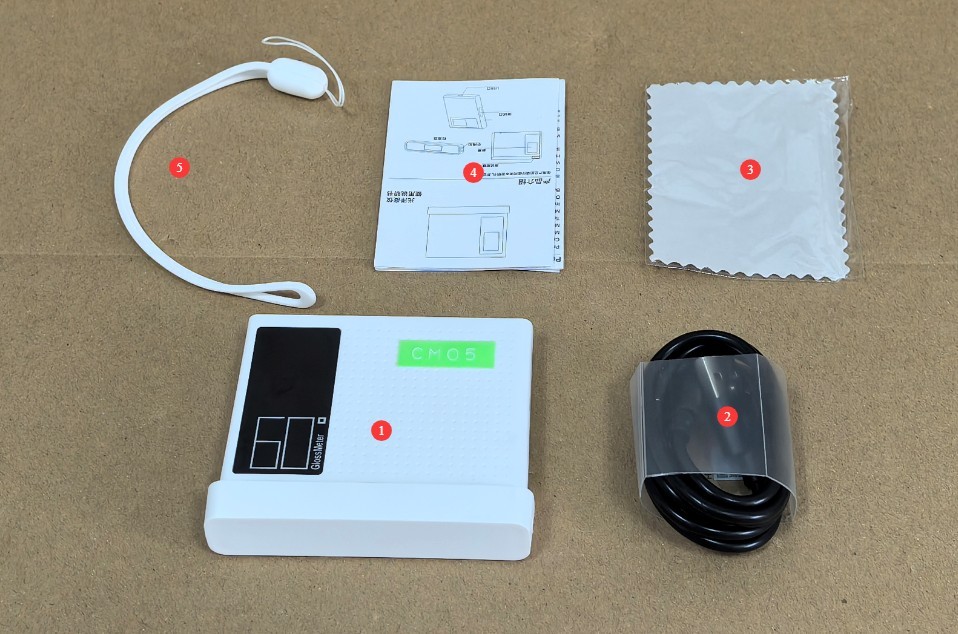
Gambar 1
Tautan unduhan untuk manual pengguna digital, perangkat lunak, kartu garansi, dan materi lainnya telah dikirim melalui email. Silakan unduh sesegera mungkin. Jika Anda melewatkan email tersebut, jangan ragu untuk menghubungi kami untuk meminta tautan unduhan lagi.
1.3 Gambaran Umum Peralatan
1.3.1 Bagian Depan Perangkat
| Jumlah | Note |
| ① | tuan rumah |
| ② | Device buttons: Power On (press briefly while the device is off), Measure (press briefly while the device is on), Auto Continuous Measurement (press and hold for 2 seconds while the device is on), Power Off (press and hold for 5 seconds while the device is on) |
| ③ | The measurement results show that |
| ④ | Calibration Base Plate |
| ⑤ | Calibration of Gloss Data for Base Plates |
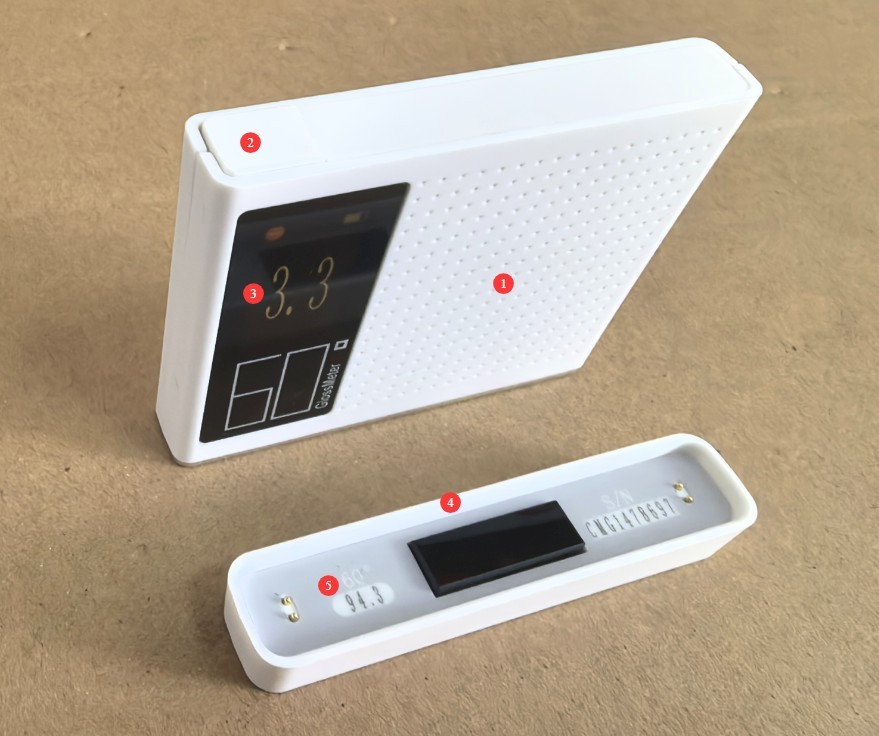
Gambar 2
1.3.2 Bagian Bawah dan Samping Peralatan
| Jumlah | Note |
| ① | Jendela Pengukuran |
| ② | The USB port is located on the side; you can charge the device using a USB cable. |
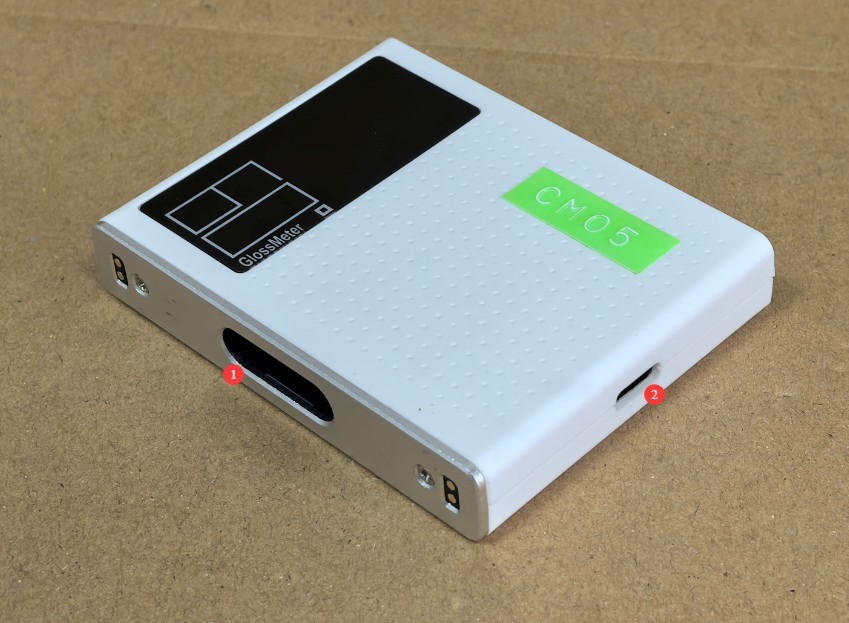
Gambar 3
2. Tindakan Pencegahan untuk Penggunaan
2.1 Tindakan Pencegahan Sebelum Pengoperasian
2.1.1 Mempersiapkan Lingkungan
Before taking a measurement, allow the device and the sample to rest in the same environment for at least 30 minutes to ensure their temperatures are the same. The measurement environment must be free from direct strong light and stray light interference. Avoid operating in environments with high temperatures, high humidity, or excessive dust. The ambient temperature should be maintained between 10°C and 35°C, with relative humidity ≤80%(no condensation).
2.1.2 Persiapan Sampel
Permukaan sampel yang diuji harus rata, bersih, bebas noda, dan bebas goresan. Untuk sampel bubuk atau cair, gunakan wadah sampel khusus untuk memastikan sampel sepenuhnya menutupi jendela pengukuran tanpa celah. Untuk sampel yang bentuknya tidak beraturan, pastikan probe pengukuran menempel rapat pada area pengukuran sampel untuk mencegah kebocoran cahaya.
2.1.3 Pemeriksaan Peralatan
Before turning on the device, check the measurement window for dust or stains, and ensure that the buttons and ports are functioning properly. After turning on the device, check that the battery is sufficiently charged (if the battery is low, charge it first to avoid a power outage during measurement).
2.2 Tindakan Pencegahan untuk Penggunaan
2.2.1 Prosedur Pengukuran
When taking a measurement, place the device’s measurement window directly against the sample’s surface, avoiding any tilting or light leakage. After pressing the device’s button, keep the device still until the measurement is complete (1 second); do not move the device during the measurement process. It is recommended to take 3–5 measurements of the same sample and use the average as the final result to minimize measurement error.
2.2.2 Kontraindikasi Penggunaan Peralatan
Jangan menyentuh komponen optik di dalam jendela pengukuran dengan tangan Anda, dan jangan arahkan jendela pengukuran ke sumber cahaya yang kuat. Karena ini adalah perangkat genggam, jangan menjatuhkan, membenturkan, atau menghancurkannya, dan hindari paparan tubuh terhadap air atau cairan lainnya.
2.3 Peringatan Keselamatan
Jangan mencoba membongkar atau mengganti bagian internal perangkat apa pun. Jika terjadi kerusakan, hubungi layanan pelanggan resmi atau dealer resmi untuk mendapatkan bantuan. Pembongkaran tanpa izin akan membatalkan garansi;
Jika cairan, debu, atau zat lain masuk ke dalam perangkat, segera matikan daya, cabut kabel pengisi daya, dan segera hubungi layanan pelanggan. Jangan terus menggunakan perangkat tersebut;
Do not place the device near heat sources, open flames, or in high-temperature environments to prevent the battery from swelling or damage to the device’s components.
3. Pengoperasian Peralatan
3.1 Measurement and Calibration Base Plate
| petunjuk | Note |
| ① | Place the device on the calibration base plate. |
| ② | Press and hold the device button briefly to take a measurement. |
| ③ | Review the measurement results and compare them with the values marked on the calibration plate. If they match, the device is functioning properly. If they do not match, please refer to Section 4.1.1, clean the measurement window and the calibration plate, and try again. |
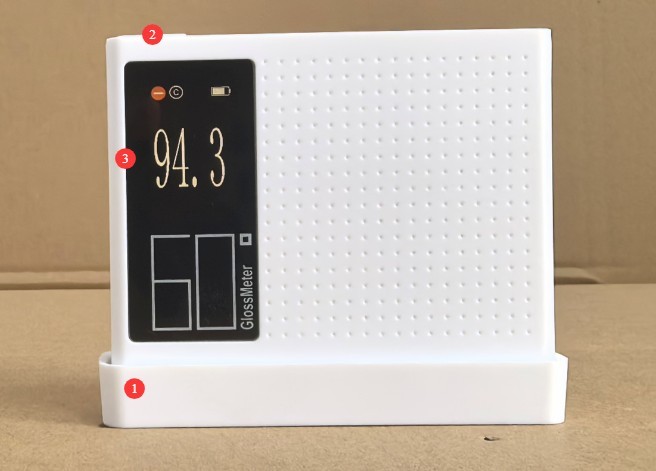
Gambar 4
3.2 Pengukuran Sampel
| petunjuk | Note |
| ① | Place the device directly against the surface of the sample so that the sample completely covers the device’s measurement window. |
| ② | Press the device button briefly to take a measurement; press and hold the device button for 2 seconds to take a continuous measurement. |
| ③ | View Measurement Results |
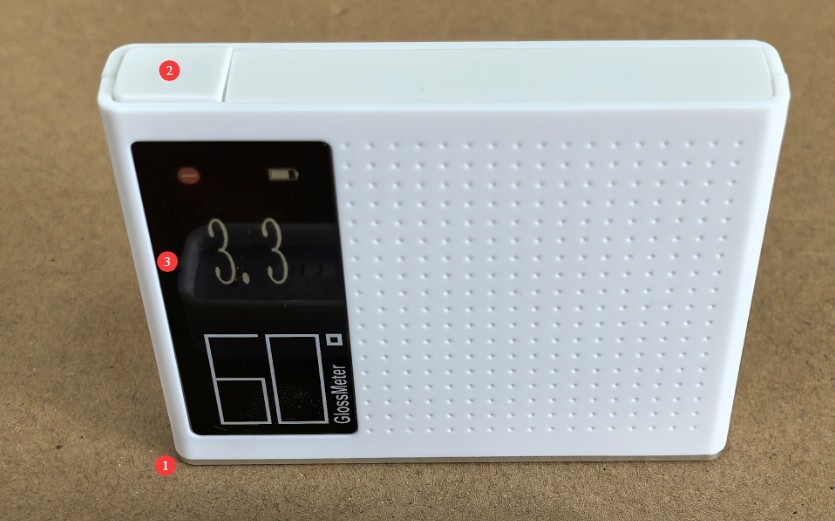
Gambar 5
4. Pemeliharaan dan Perawatan Peralatan Harian
4.1 Pembersihan dan Perawatan
Body Surface: Wipe dust and stains from the body with a clean, soft cloth. For stubborn stains, lightly wipe the area with a small amount of water. Do not use detergents or other corrosive liquids;
Layar: Usap layar dengan lembut menggunakan kain pembersih layar khusus untuk menghindari goresan. Jangan sentuh layar langsung dengan jari Anda. Jika debu menempel pada layar, bersihkan dengan lembut menggunakan sikat bebas serat.
Measurement Window and Calibration Base Plate: Clean with the provided cleaning cloth. If there are stubborn stains, contact us promptly for maintenance. Do not attempt to sand or repair the calibration base plate yourself.
4.2 Pemeliharaan Baterai
4.2.1 Pengisian Daya dan Perawatan
Use the device’s standard USB cable; do not use non-standard fast-charging cables or high-wattage chargers to avoid damaging the battery. Avoid charging the device in high-temperature environments, and unplug the charging cable immediately after charging is complete to prevent overcharging. Charge the device promptly when the battery level falls below 15% to avoid deep discharge of the lithium-ion battery, which can shorten its service life.
4.2.2 Pemeliharaan Masa Pakai Baterai
Baterai lithium bawaan perangkat ini dapat diisi ulang; dalam penggunaan normal, sekali pengisian daya memungkinkan untuk 15000 pengukuran berturut-turut;
When the device is not in use for an extended period, ensure that the battery charge level remains between 50% and 80%. Recharge the battery once every three months to restore the charge level to between 50% and 80%, thereby preventing the battery from becoming deeply discharged or swelling;
Jika baterai menunjukkan tanda-tanda pembengkakan, kebocoran, atau penurunan masa pakai baterai yang signifikan, segera hentikan penggunaannya dan hubungi kami untuk perbaikan.
5. Pemecahan Masalah dan Penyelesaian Masalah Umum
| Gejala Kesalahan | Kemungkinan penyebab | Prosedur |
| Tidak dapat menyala | Baterai lemah | Harap gunakan kabel USB khusus untuk mengisi daya perangkat; jika perangkat masih tidak menyala setelah diisi daya, silakan hubungi kami untuk perbaikan. |
| Daya tahan baterai telah menurun. | Penurunan kualitas baterai, suhu lingkungan yang berlebihan | Contact us for repairs; using the device in high-temperature environments causes the battery to drain quickly. Please use it in a normal environment. |
| Kesalahan Signifikan dalam Data Pengukuran | Sampel tidak merata atau tidak sepenuhnya menutupi jendela pengukuran; pelat kalibrasi terkontaminasi; jendela pengukuran terkontaminasi | Ganti dengan sampel yang sesuai; bersihkan atau ganti pelat kalibrasi; bersihkan jendela pengukuran; jika ada noda membandel, hubungi kami untuk layanan perbaikan. |